
Thousands of candidates visit the FIA recruitment portal daily to check application updates, fee status, and test information. However, many applicants face login issues because they forget their password or enter incorrect details.
If your FIA account is not opening, there is no need to worry. This complete guide explains how to reset your FIA job portal password, recover your account, and solve common login problems in a simple way.
Open the Official FIA Job Portal
To begin the login or password recovery process, first open the official FIA recruitment website.
These are the official platforms used for FIA jobs, application tracking, and roll number slips.
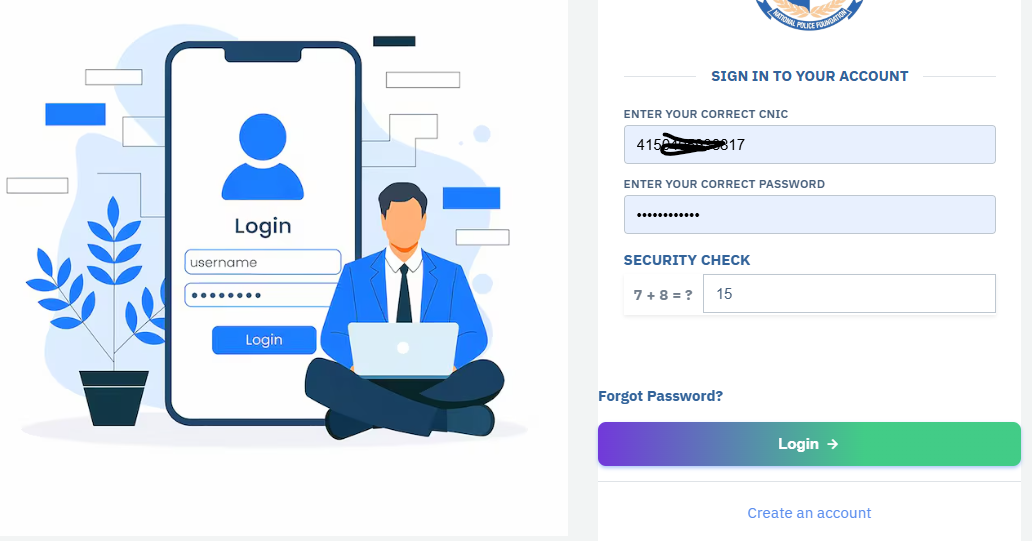
How to Login to FIA Account
After opening the website, click on the Login button.
You will see a sign-in page where candidates must enter their account details carefully.
Enter the Required Information
Fill the following boxes correctly:
- CNIC Number
- Password
- Security Captcha Code
After entering all information, click on the Login button.
If your details are correct, the FIA dashboard will open successfully.
Forgot FIA Portal Password? Follow These Steps
Many users forget their account password after submitting the online application. The FIA portal provides an easy recovery option for such candidates.
Open Forgot Password Page
Visit the official password recovery page:
The screen will display the message:
“Did you forget your password?”
FIA Password Reset Process
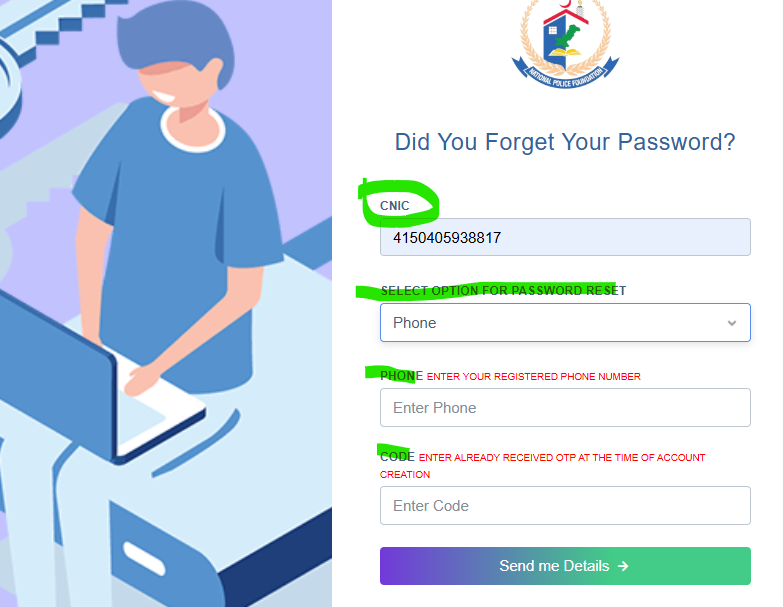
The recovery process is simple and only takes a few minutes.
Step 1 – Enter CNIC Number
Type your correct CNIC number in the required field.
Always use the same CNIC that was used during account registration.
Step 2 – Choose Recovery Option
Now select one option for resetting the password:
- Registered Email Address
- Registered Mobile Number
Choose the option that is active and available to you.
Step 3 – Verify with OTP Code
The FIA system will send an OTP verification code to your selected option.
Enter the received OTP code carefully.
After that, click on:
“Send Me Detail”
If all information is correct, your account recovery details will appear on the screen.
What You Can Check After Login
Once your account opens successfully, several useful options become available in your FIA profile dashboard.
Dashboard Features
Candidates can:
- Check submitted application details
- View fee paid status
- Update profile information
- Download roll number slip
- Verify personal information
- Track recruitment updates
These options help applicants manage their FIA recruitment process online.
How to Download FIA Roll Number Slip
When the test phase starts, candidates can download their roll number slip directly from the FIA portal.
Download Method
- Login to your FIA account
- Open the dashboard
- Find the Roll Number Slip section
- Download or print the slip
Roll Number Slip Download
Applicants must carry the roll number slip during physical tests, written exams, or interviews.
Common FIA Login Issues and Their Solutions
Sometimes candidates enter correct details but still face login problems. Here are some common issues and easy fixes.
Incorrect Password
Make sure caps lock is off while typing the password.
If the problem continues, use the forgot password option.
Wrong CNIC Format
Enter your CNIC carefully and avoid unnecessary spaces.
Captcha Error
Refresh the page and enter the new security code again.
OTP Not Received
Wait for a few minutes and check your spam folder or SMS inbox.
Also confirm that your registered number is active.
Important Tips for FIA Applicants
- Save your password safely after registration
- Use only official FIA websites
- Never share your account information publicly
- Check the portal regularly for test announcements
- Download your roll number slip before the exam date
Also Read About: FIA Physical Test 2026
Final Words
The FIA online portal allows candidates to manage their recruitment activities easily. If you forget your password or cannot access your account, the official recovery system can help you regain access within minutes.
By following the steps explained above, applicants can solve login problems, recover their FIA account, and continue the recruitment process smoothly.